
Tour operators have two general paths to create a booking website:
- The first is a standard website builder — Wix, Squarespace, WordPress, and the like. There are dozens of options here, which are all pretty simple to use. Most come with add-ons that let you embed a booking engine directly into your site.
- The second is a tour booking management system with an in-built website builder. This tends to be the smarter option for most operators because the builder comes bundled with everything else you need to run your business — availability, product, resource, and customer management; check-in tools like mobile tickets and ticket scanning; connections to other online sales channels. Since you’ll need a booking management system at some point anyway, using one that builds your site too just makes sense.
But regardless of which path you choose, most website builders work in the same way — so the steps below apply to both. We’ll walk through how to get a bookable website up and running, then give you a closer look at how it works inside Bókun.
1. Choose your platform
Your first decision is which path to take — a general website builder or a tour booking management system.
If you’re comparing general builders, look at:
- Ease of use. Most use drag-and-drop editors, but the learning curve varies.
- Pricing. Compare subscription costs and billing frequency.
- Domain hosting. Some builders cover your domain name, others require you to purchase one separately through a registrar like GoDaddy.
- Booking widget and form support. This is arguably the most important thing to consider here. A booking widget is what lets customers check availability, pick a date and time slot, and pay directly on your site — and a booking form captures the guest information you need before they arrive. Without these, your site is more or less just a digital brochure. Make sure your builder has its own add-on or supports third-party embeds before you commit to a platform.
Read more: Best tour booking plugins for WordPress
The same criteria apply when comparing booking management systems — ease of use, pricing, domain hosting — but the key (obvious) thing to check here is whether a website builder is included. Most do offer one, but not all. If it does, the builder will come with a booking engine already built in, so the widget question answers itself.
Pro Tip: When evaluating booking management systems, look beyond the website builder and consider how each platform helps you sell tours online. Most connect to OTAs and online marketplaces, but some — like Bókun — also offer reseller networks and affiliate support. If growing your online reach is a priority (as it is for many folks who want to create a booking website), those distribution features are worth factoring into your decision.
One other thing worth flagging here: booking fees. Many platforms — both booking widgets and booking management systems — charge a percentage of each booking on top of any subscription fee, so you should be clear on pricing and do the math to understand how fees can impact margins.
2. Select a template and customise your design
Most builders offer a library of website templates to choose from. Pick one that suits your brand and the type of tours or activities you offer. A wildlife safari company and a city walking tour operator have pretty different vibes, and your site should reflect that.
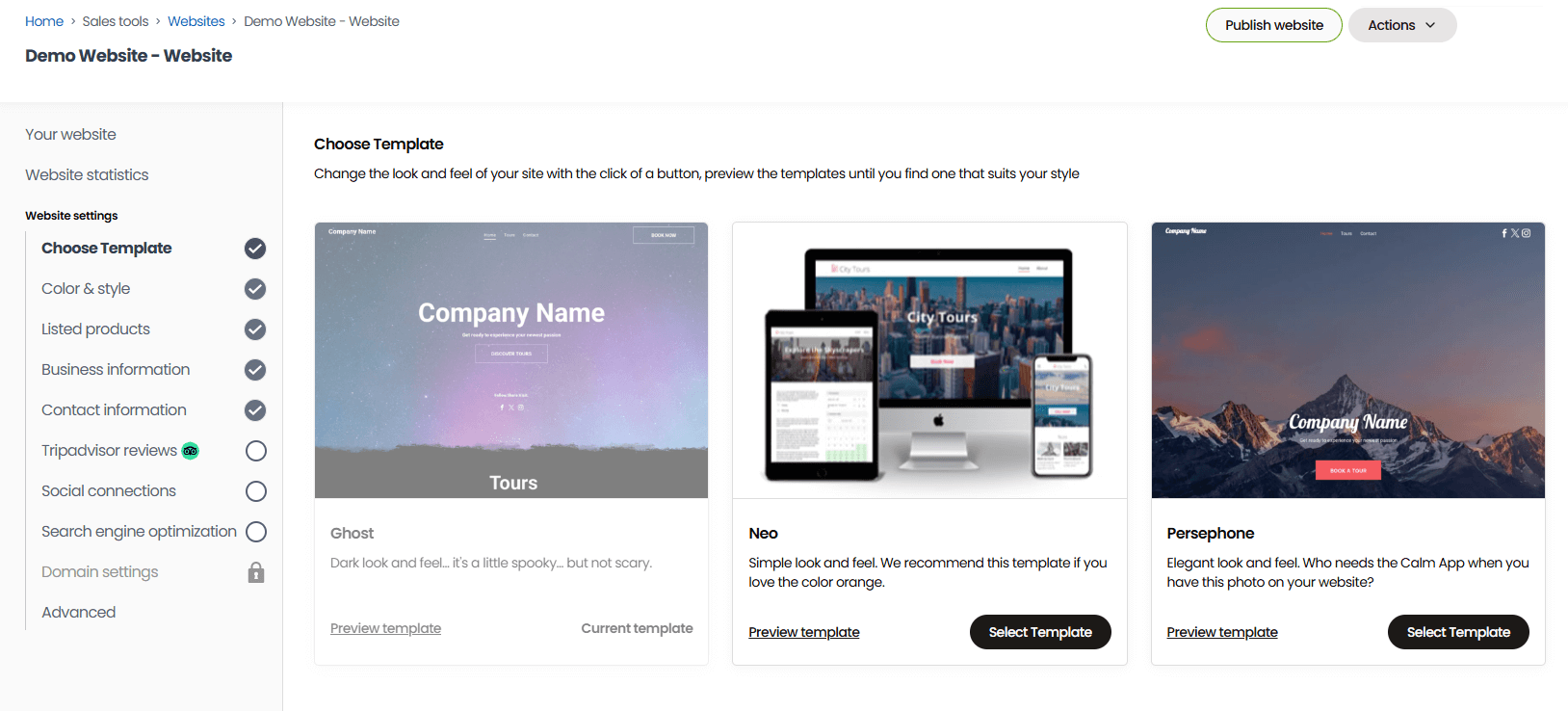
Once you’ve chosen a template, customise it with your branding: logo, colours, fonts, and imagery. Most builders don’t require any coding knowledge — customisation is drag-and-drop. But if you want more control over the look and feel of your website design, most also allow custom CSS.
A few things to keep in mind as you build:
- The key pages to include. You should have a homepage, about page, contact page, and individual product pages (more on those in Step 4).
- Mobile-friendliness is non-negotiable. A large portion of travellers book from their phones, so make sure your template looks good and functions well on smaller screens before you go live.
- Invest in real photography. High-quality images of your actual tours and locations do more for conversions than any stock photo. If professional photography isn’t in the budget yet, even clear smartphone shots of real experiences beat generic imagery. Just make sure you compress images before uploading — large files slow your site down, which hurts both SEO and conversions.
- Make your CTAs obvious. Every page should nudge visitors to book and give them multiple entry points to start the booking process. “Book Now” buttons should be prominent, above the fold where possible, and repeated throughout longer pages.
- Cover your SEO basics. For example, give every page a title tag and meta description, and add alt text to your images. You can read more about SEO strategies to boost website bookings in our guide here.
3. Set up your domain
Your domain is your website address — yourtourcompany.com. You should keep your domain name simple, memorable, and close to your business name. Avoid hyphens, numbers, and anything that’s hard to spell when heard out loud.
Once you know the website name you like best, you can check its availability and secure it. In most cases, your website builder will have the tools to do this. And some (like Bókun) cover the registration and renewal costs, so there’s not an extra budget item.
However, if your builder doesn’t support this step, you’ll have to use a third-party like GoDaddy or Namecheap to purchase a domain name and connect it manually. While this creates some extra work, the process is pretty straightforward:
- After you purchase your domain, navigate to your domain’s DNS settings — usually found under “DNS,” “DNS Management,” or “Manage Domain.” Here you’ll see the fields you need to complete to link your website.
- Then, in your website builder settings, find the specific values you need to copy over — typically an IP address and a domain name.
- Copy those values, paste them in your DNS settings, and click save.
Note: It can take anywhere from a few minutes to 72 hours for your domain to connect, so don’t panic if it doesn’t work immediately.
Also, confirm your site is secured with HTTPS before you go live. Most builders handle this automatically, but it’s worth double-checking — just look for the padlock icon in your browser address bar when you preview your site. If it’s missing, head to your builder’s security or SSL settings to enable it.
4. Create pages for each of your tours and activities
Every tour or activity needs its own booking page so customers can find, browse, and reserve tours. Think of these as your most important pages — they’re where purchase decisions get made.
In a general website builder, you’ll create these manually, the same way you’d create any other page on your site. Add a new page, fill in the details, and embed your booking widget.
In a booking management system, the process is more streamlined — you add your products in the platform’s product builder, and they automatically populate as pages on your site.
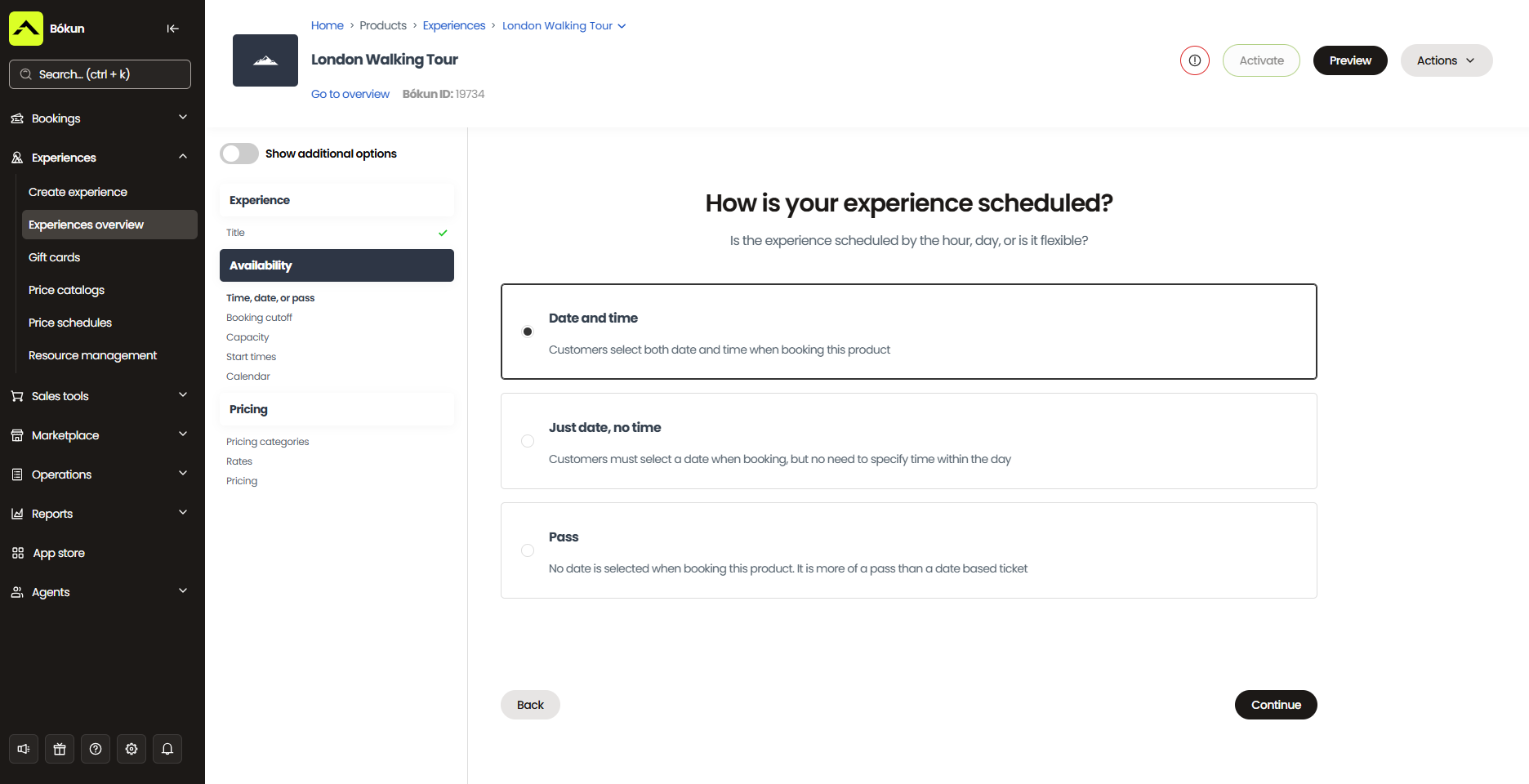
Either way, here’s what each product page should include:
- The tour name, description, and itinerary
- Duration and location
- What to bring and any physical requirements
- Pick-up and drop-off details
- Cancellation policy
- Pricing
- Availability
- Photos and video
- A prominent booking widget or button
- A booking form to capture guest information
If you’re using a booking management system, the product builder will also walk you through adding upsells and add-ons, bundling products into combo experiences, and selling gift cards or vouchers.
General website builders can support some of these extras too, but typically through third-party plugins rather than native functionality.
5. Set up online payment gateways
Before you can take bookings, you need a payment processor connected to your booking engine — whether that’s a widget or a booking management system, both handle payments through an integrated processor.
The difference is in the options available. Booking widgets typically integrate with one or two major processors — usually Stripe or PayPal. Booking management systems tend to offer more flexibility, supporting a wider range of processors so you can give customers more choice at checkout.
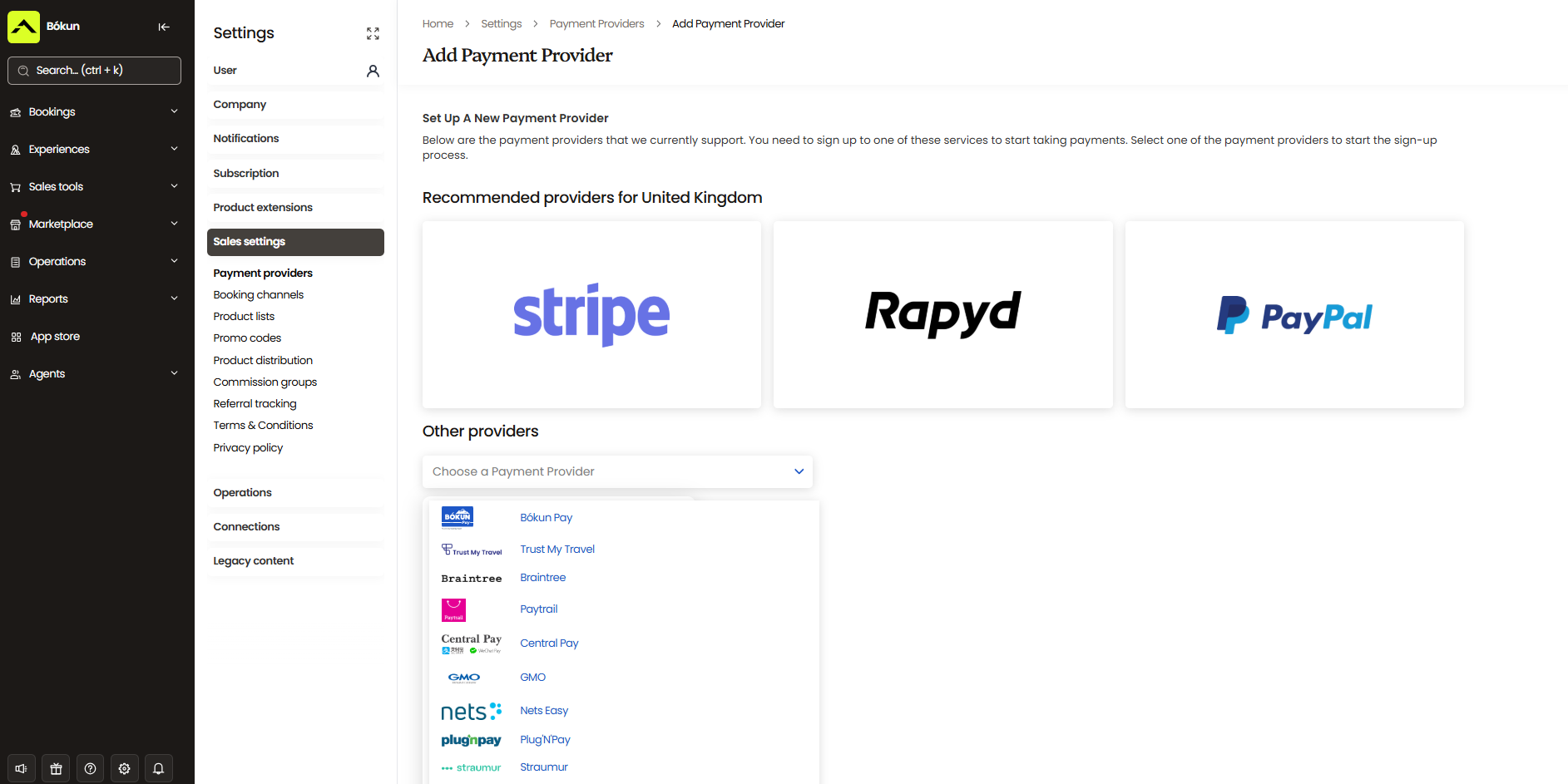
A few things worth thinking about as you compare payment processors:
- Transaction fees. Mostprocessors charge a percentage per transaction on top of any platform booking fees.
- Currency support. If you’re taking international bookings, confirm your checkout supports the currencies your customers book in.
- Refunds and cancellations. Make sure your processor supports automated refunds, especially if you’re offering a self-service cancellation option.
- Full payment vs. deposits. Decide whether you want to take full payment upfront, collect a deposit and charge the remainder closer to the date, or offer on-request bookings. Make sure your platform supports the model that works best for your business.
- Mobile checkout. Your booking experience and payment flow need to work as smoothly on a phone as it does on a desktop.
- Trust signals at checkout. Secure payment badges, SSL certificates, and recognisable processor logos all help reassure customers who are on the fence about booking.
Read more:A complete guide to payment processing tools for the travel industry
Test your site before launch
Before you go live, run through your site — on both desktop and mobile — to make sure it’s easy to navigate, pages load correctly, and the booking process is smooth. Check that every link works, the booking form captures everything you need, and payments process correctly. It’s much easier to catch issues now than after you’ve sent customers to the site.
How this works in Bókun
Bókun is an all-in-one booking management system built specifically for tour operators, and every plan includes a free website builder. The base website gives you a homepage, tours page, and contact page — enough to get online and start taking bookings straight away. And you can follow the steps we outlined above to build out your site.
But we also let you take things a step further with our Advanced Website Upgrade (this is free for all users; you just have to activate it in our App Store). This gives you:
- Full design control. Customise text, buttons, images, backgrounds, and navigation across your entire site from a single global design menu — keeping your look and feel consistent without touching each page individually.
- Unlimited pages. Create, reorder, and manage as many pages as your business needs.
- Customisable booking widgets and forms. Tailor the look and feel of your widgets to match your branding. You can also customise booking forms to gather all the information you need from guests at the very first touchpoint.
- Product organisation. Display your tours on specific pages or group them into categories — useful if you offer a wide range of experiences and want to make browsing easier for visitors.
- The Tripadvisor connection. Display these reviews across your site and build credibility as travellers make booking decisions.
- A dedicated image gallery. Showcase your tours and experiences with a professional gallery page.
- A blog. Set up a blog and create posts optimised for SEO — useful for driving organic traffic to your site.
- SEO tools. Add page titles, meta descriptions, and other on-page SEO elements to help your site rank in search engines for target keywords.
- Site translations. Make your site available in multiple languages to reach international travellers more easily.
- Social media widgets. Link your social profiles directly on your site so travellers can quickly find and follow you.
- Google Analytics integration. Connect GA to track site traffic, visitor behaviour, and conversions, and measure overall site performance.
Now, your website is just one part of the picture. Here’s everything else Bókun brings to the table:
- 70+ OTA and online marketplace connections. Connect to Viator, GetYourGuide, Tripadvisor, Airbnb Experiences, Expedia, Civitatis, Klook, TourRadar, and more. We’re the #1 restech partner across major names, and Bókun holds premium partnerships with Viator, GetYourGuide, and Google Things to Do.
- Marketplace. Our in-built reseller network with thousands of travel industry businesses — travel agents, DMCs, accommodation providers like hotels and resorts, transportation companies, educational institutions, attractions, and other operators. Here, you can create partnerships to win bookings from their audiences, resell others’ services to earn commissions, and create bundle packages to diversify your product line.
- Affiliate support. Referral Tracking lets you build a custom affiliate network with anybody you want to work with — beyond the Marketplace. Win bookings from other local businesses, travel bloggers, social media influencers, tourism boards, whoever complements your business. Add as many affiliates as you like, negotiate commission rates individually, and assign trackable booking links to see who brings you the most business.
- Central booking calendar. To manage every booking in one place. Bookings from your website, OTAs, partners, and affiliates automatically route here, and you can add in-person or phone bookings to keep track of the full scope. You never have to jump between calendars to get a clear picture of what’s coming up.
- Real-time availability updates. Bókun automatically sends updated availability and inventory across all your connected sales channels the moment a booking comes in, so you never have to deal with double bookings or manually updating calendars.
- Product and resource management. Build and manage your tour listings, add availability, set pricing rules, and track the equipment, vehicles, guides, and other resources needed to run your experiences.
- CRM. Bókun stores all your customer data in a neat contact book so you can see who’s booking with you and learn more about your customer base. This also feeds into our automated communications tool, so you can reach out to the right people at the right time — whether that’s with a post-tour thank you, a rebooking nudge, or a seasonal promo. And this saves you from another software subscription.
- Automated communications. To dispatch booking confirmations, mobile tickets, pre-tour reminders, and follow-ups so your team doesn’t have to send them manually. You can also use our template gallery to power abandoned cart reminders, upsells, retargeting campaigns, and other email marketing initiatives, such as newsletters, new product or event announcements, and seasonal promotions.
- Customer self-service portals. So customers can view their booking details, purchase add-ons, and reschedule or cancel independently, without back-and-forth emails or phone calls with your team.
- Check-in tools. Simplify day-of arrivals with mobile tickets and ticket scanning. Our desktop and mobile apps let guides pull manifests, check guests in, and track no-shows — so you don’t have guests waiting in long queues or tours falling behind schedule.
- Reporting. Measure bookings and revenue by sales channel, product, and season to understand what’s working and where you can improve.
- Mobile apps. iOS and Android apps so you and your team can access the booking calendar, manage reservations, and scan customer tickets at check-in — from anywhere.
Our App Store also lets you add other modules to your set-up, so you can configure Bókun with the exact tools you need to run your operations. You don’t need some hefty tech stack with a dozen and one disconnected systems.
Bókun is part of the Tripadvisor and Viator family, and one of the most top-rated tour operator software around — with a 4.7-star rating for our:
- All-in-one toolkit. You can manage your entire operation in Bókun. Our system lets you keep everything under one roof and automate the complex admin work to make your life easier. Our customers say it’s like having 10 extra people on the team, without the extra headcount.
- Ease of use. We’ve designed Bókun to be super user-friendly and straightforward, so it doesn’t require any lengthy training. Our users can complete setup, build a website, connect to other online channels, and get fully rolling in just an afternoon.
- Industry-low pricing and value for money. Our START plan includes all core features listed above, with the advanced website upgrade, for only $49 a month. And our fees are among the lowest in the industry, at just 1.5% for online bookings. We waive Bókun booking fees on Viator reservations, and we never charge for offline bookings. Our system is affordable for even the smallest teams — we work with a lot of solo business owners just getting started.
- Unrivalled growth drivers. Competitors just can’t match us here. We connect with countless online sales channels, offer industry-leading partnerships, have *the largest* in-built reseller network, and provide unique affiliate support so you have tons of ways to earn bookings beyond just your website.
- Customer support. Our team is with you every step of the way. Reach out to us any time you need. We even offer guided setup and strategy calls for enterprise teams as they scale in our system, so Bókun can support you no matter how far you grow or how advanced your needs are.
You can try Bókun and start building your booking site completely risk-free with our 14-day trial here (no credit card required).
Related reads: