
Creating a booking system in Microsoft Excel (or Google Sheets) is a simple, affordable way to manage tour reservations. It lets you keep a clear record of bookings and key reservation details.
However, in our experience working with dozens of tour operators over the past 10+ years, we’ve found that relying on a manual system like this has clear limitations and isn’t sustainable as you grow. As bookings and sales channels increase, these sheets become harder to manage, demand significant manual effort, and leave plenty of room for errors.
Excel simply doesn’t have the functionality tour operators need — it can’t automatically update when bookings change, prevent overbookings, or connect with the sales channels customers actually use.
In this guide, we walk through the steps to create a booking system in Excel. Then, we cover the limitations of an Excel-based system and explain how our booking software, Bókun, makes booking management easier for tour operators.
To learn more about Bókun, start a 14-day free trial — no credit card required!
How to create a booking system in Microsoft Excel & Google Sheets
Using a spreadsheet solution — like Excel or Google Sheets — to manage bookings can work well for small businesses in scenarios when you have a low volume of bookings and few staff members. You can create basic tools to log reservations, schedule staff, and track booking details.
Excel and Google offer very similar solutions to manage bookings; both systems provide custom form builders that pair with their spreadsheet tools (Excel spreadsheets and Microsoft Forms; Google Sheets and Forms).
Regardless of the system you choose, the easiest solution is to create a form that links to your spreadsheet — the form is where the customer completes the booking, which automatically syncs with your spreadsheet and shows new reservations.
We’ll show you how this works in Google Sheets/Forms, but it’s largely equivalent to Excel/Microsoft Forms:
First, create a new spreadsheet and title it — we’ll call ours “Tour Bookings 2026”.
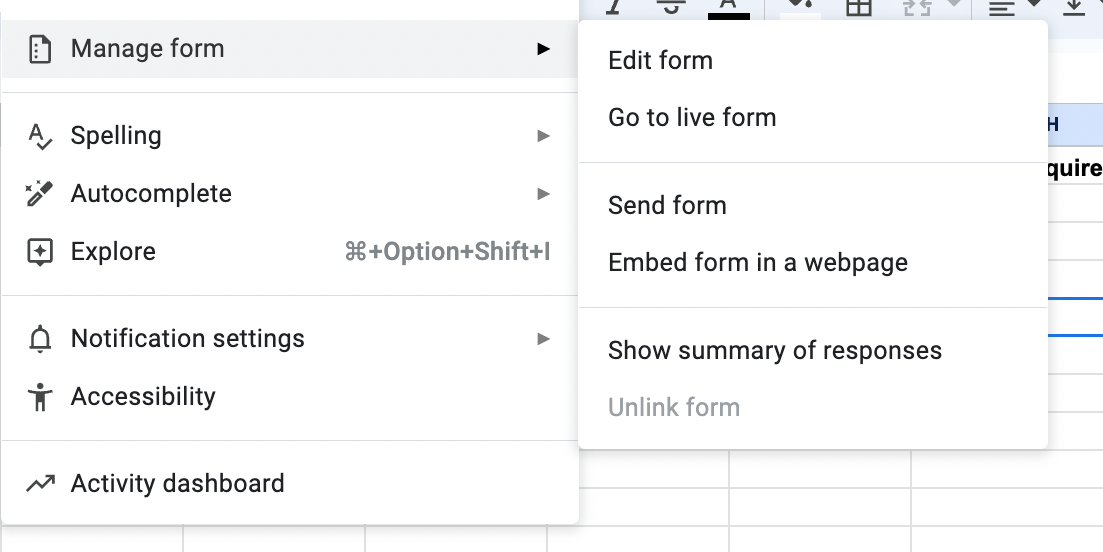
Then, create a form that links with your sheet. Under the “Tools” dropdown menu, you’ll see “Create a new form.”
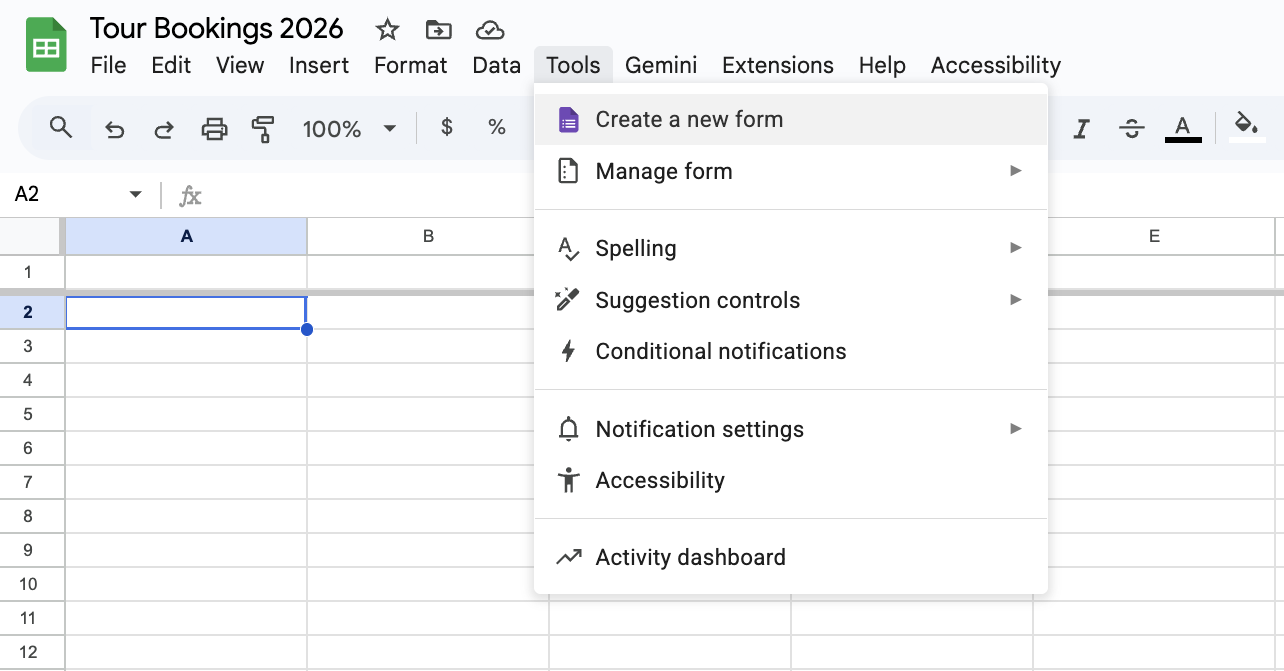
You can design this form to gather all necessary information from attendees before they arrive.
You’ll want to log basic information, such as the tour or activity they book and the date/time of their reservation. You should also ask customers to share their contact information (email and phone number), specify the number of attendees, and share any special requirements.
There are several ways to format questions to collect all the information you need. Since these form builders are straightforward to use, anyone can create custom surveys.
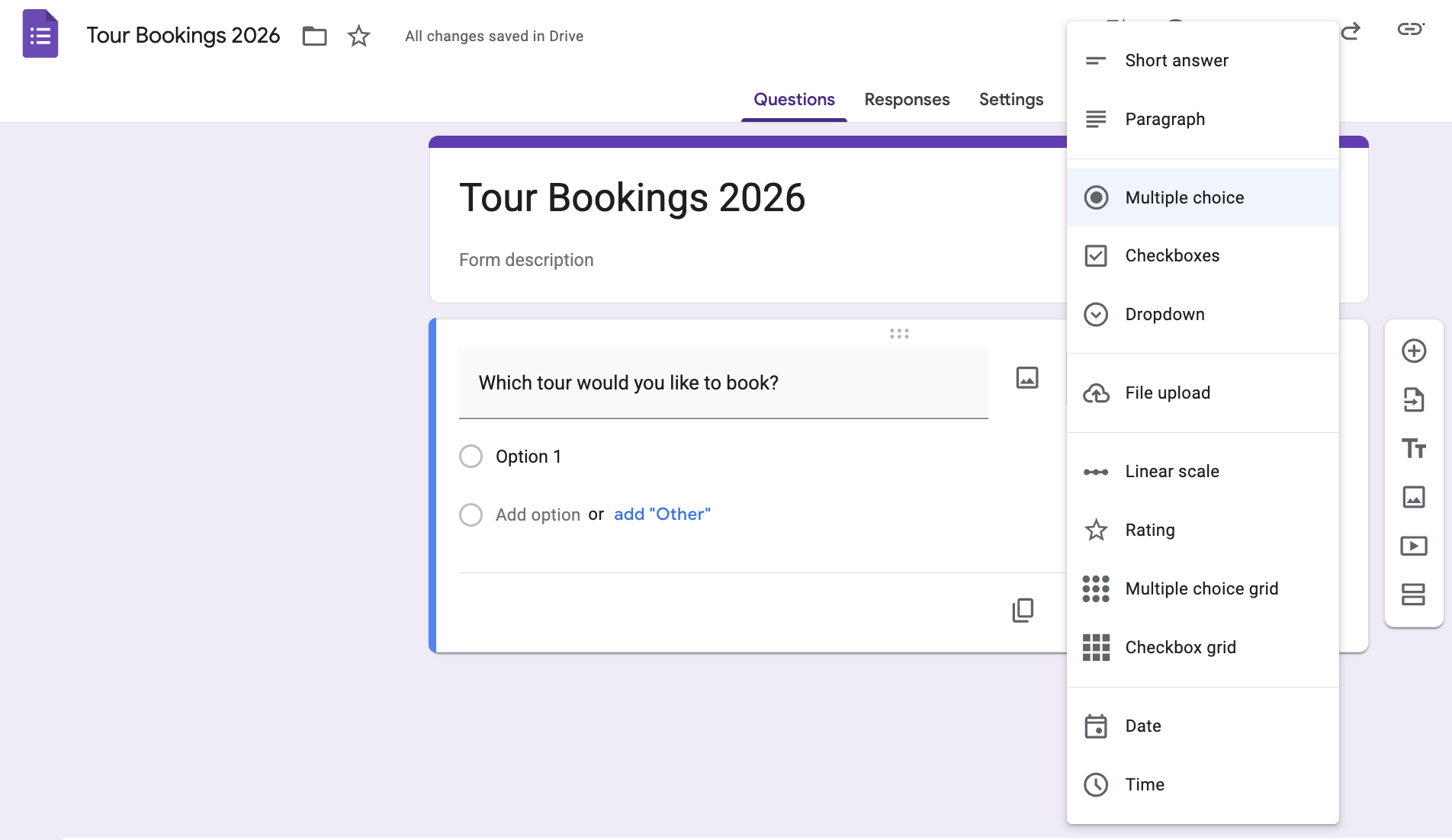
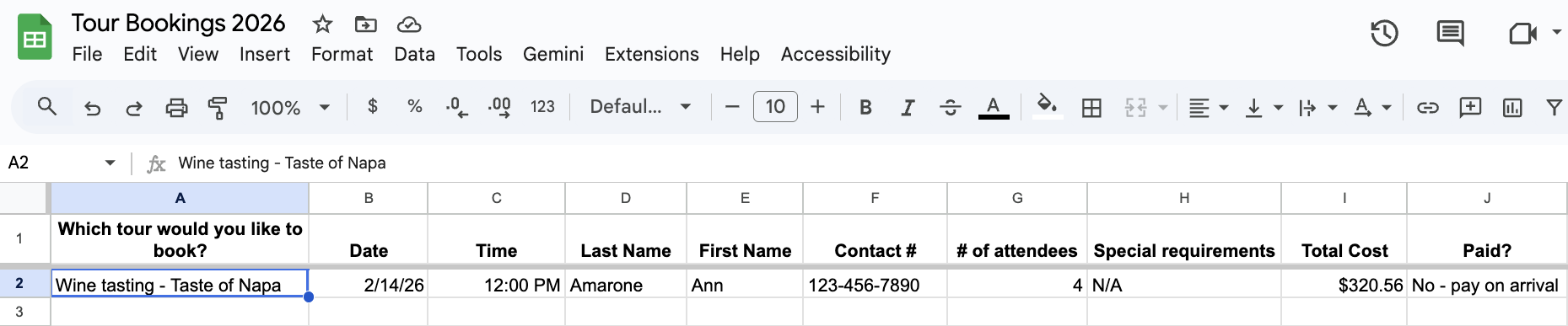
After completing the form, the questions automatically convert to columns in the linked spreadsheet, and any answers to those questions (form fills) automatically populate in the rows below. You can check the form to see the latest reservations, then you can schedule staff and manage payment information.
Note: You can add columns to the sheet for staff scheduling and managing payments, but you will need to enter this information manually.
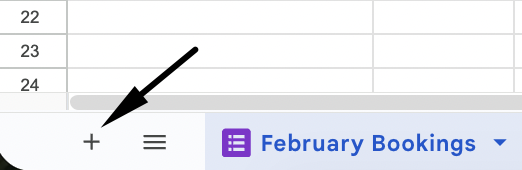
Pro tip: We suggest creating a new sheet each month (you can do this within your main spreadsheet) to keep reservations organised. Then you don’t have one massive booking spreadsheet, and it’s easy to reference past bookings.
You can select the + on the bottom left-hand corner to add a new sheet; then, you can link the form you’ve already created to log answers in the new sheet.
There are a few ways to share your form and track reservations:
- Embed the link on your website so users can make reservations at their convenience.
- Send the link via email or text after customers contact you.
- Internal staff can complete the form to track walk-up and in-person reservations.
You can edit forms at any time, and the changes will update automatically in your sheet.
So, in summary, here are the benefits of a spreadsheet-based booking system like this:
- It’s completely free to use.
- It allows a lot of customisation, as you can design your form however you like.
- You can easily track all your reservations, past and present, in one place.
The limitations of Excel-based booking management
However, as we mentioned, spreadsheets have limitations, particularly as the business grows and the number of bookings increases:
1. Forms only allow customers to request bookings with you — the form doesn’t operate as a calendar, so they can’t see your availability, and if the booking time they choose works with your schedule.
This type of scheduling isn’t automatic: there’s always going to be some back-and-forth with customers because you have to call them to confirm bookings and collect payment information.
If the booking times don’t work, you’re rescheduling (which could put you at risk of losing a sale).
Solution: Booking management software like Bókun lets customers see your calendar and availability at the time of booking and pay through a secure online portal, so customers can instantly confirm reservations.
2. Spreadsheets become harder to maintain as you receive more bookings; it’s not uncommon for team members to accidentally overbook, add the wrong payment information to the sheet (for example, mark the wrong attendees as “paid”), or double-book staff members.
Solution: Booking software automatically keeps things organised; attendees can only book approved time slots (no double bookings), you receive and manage payments through the system (everything is correctly logged), and resource management simplifies scheduling so you can see who’s available at specific times and avoid double booking team members.
3. You can only share the form link on your website or after customers contact you, and it only lets users request bookings. However, most people are finding things to do and booking on popular travel sites like Viator, GetYourGuide, and Expedia. So, you’re not being found as often. When you are, customers don’t have the most convenient booking options — they have to find the form, fill it out, and then go through the back-and-forth (above) with you. This adds more and more drop-off points where you can lose bookings.
Solution: Booking software allows you to make your website bookable and connect with online travel agencies (OTAs) to receive bookings on the sites customers use to find tours and activities. It’s a seamless process.
Ultimately, manual data entry in spreadsheets consumes employee time, creates operational inefficiencies, and increases the risk of lost sales due to delays and miscommunication.
Bókun: Advantages of dedicated booking software over Excel
Spreadsheets are a workaround. They can hold data, but they can’t run your business — they don’t take bookings, prevent overbookings, connect you to the sites where travellers actually book, or keep your team in sync without constant manual effort.
Bókun is a booking solution built specifically for tour and activity operators. It handles the full booking experience — from the moment a customer finds you to the moment they leave a review — so you’re not spending your days updating cells and chasing confirmations.
Here’s what that looks like in practice.
Stop managing bookings & availability manually — let Bókun handle it
One of the biggest frustrations with spreadsheet booking is that customers can’t see your availability. They fill out a form, you check your schedule, you follow up to confirm (or reschedule), you chase payment — and somewhere in that back-and-forth, you lose bookings.
Bókun eliminates that entirely. You set your availability by product — specifying how customers book and which days and times you run each tour — and those rules automatically populate your booking calendar. Customers see exactly what’s available in real time and book instantly, without any back-and-forth.
When a booking comes in, your calendar updates immediately across every connected sales channel. No manual adjustments, no risk of double bookings. And if you need to close out a specific date or time on the fly, you can do it directly from the calendar in seconds.
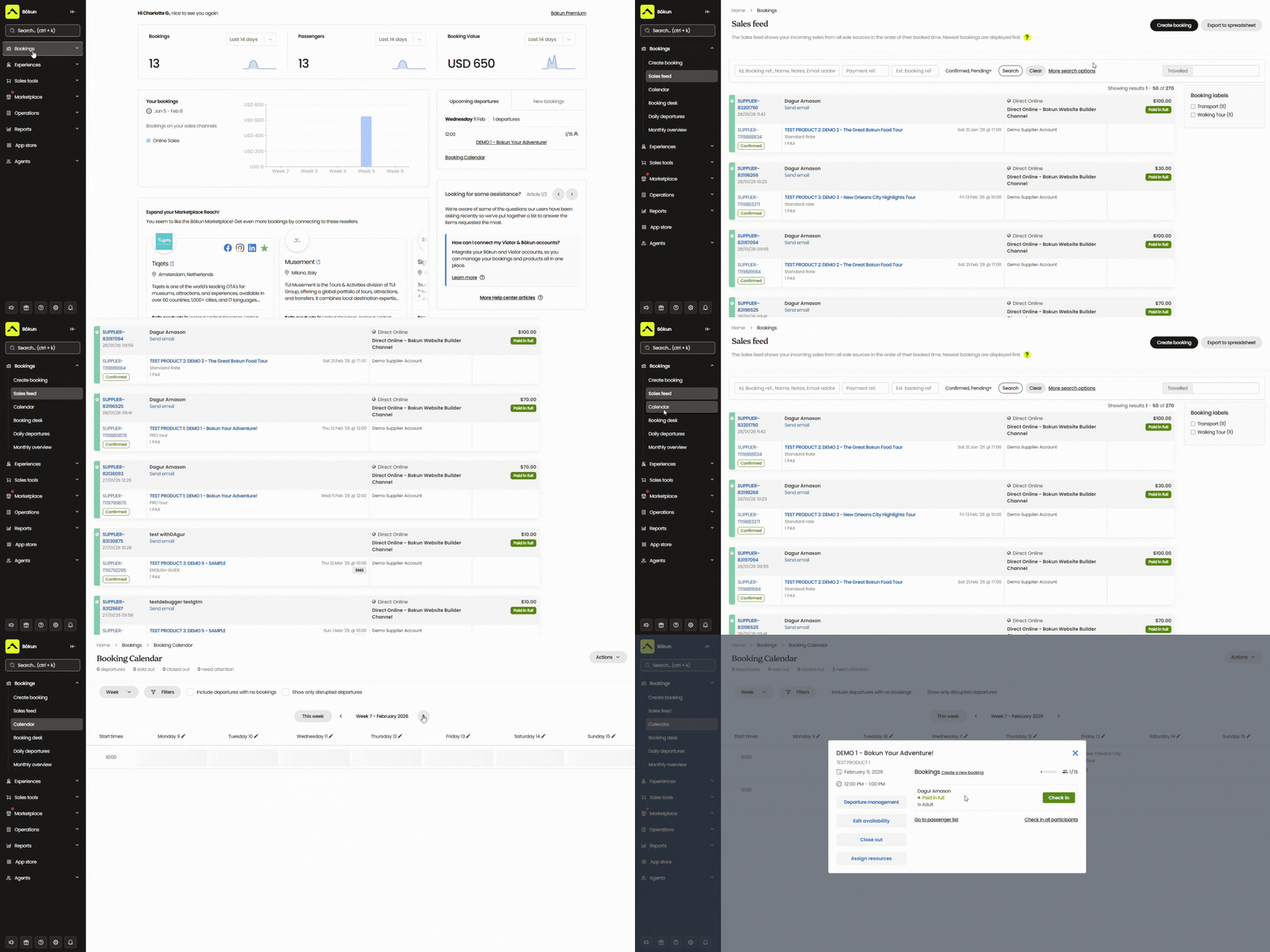
Customers can also cancel or modify their own bookings through Bókun’s self-service tools, and your calendar updates automatically — without phone calls, spreadsheet edits, or wasted time.
Get bookings from everywhere — not just people who already know you
A spreadsheet form only captures bookings from people who have already found you. That’s a significant ceiling on your growth.
Most travellers don’t find tour operators through a contact form — they search on Viator, GetYourGuide, Expedia, and other OTAs, browse options, and book instantly. If you’re not there, you’re invisible to a huge pool of potential customers.
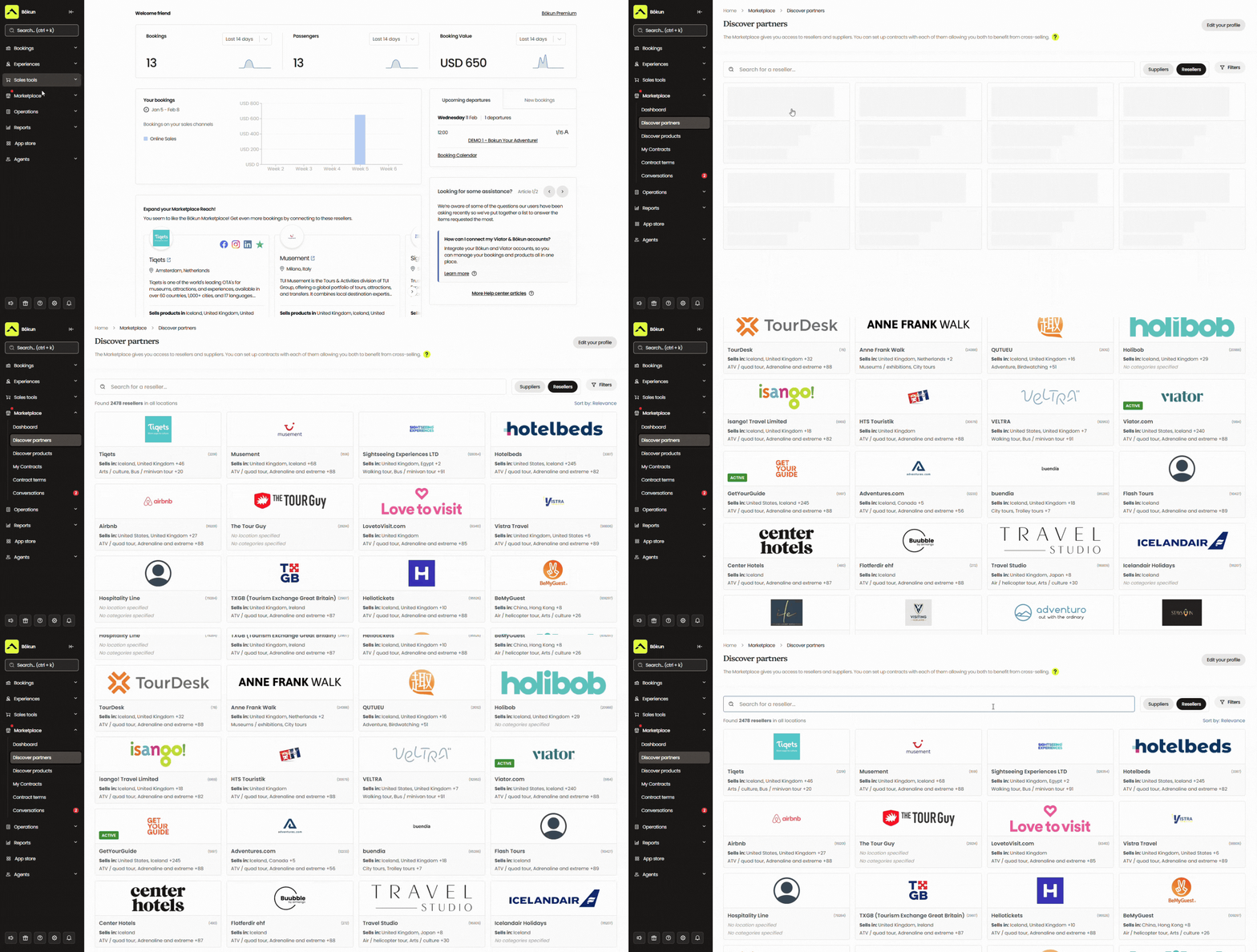
Bókun connects you to those platforms (and is the #1 restech partner across major OTAs!) so you can list your tours and activities on OTAs and manage everything — availability, pricing, bookings — from one place. Then, when a booking comes in through an OTA like Viator, it shows up in your Bókun calendar, and your availability updates across all channels in real time. No double bookings, no manual syncing.
Beyond OTAs, the Bókun Marketplace lets you grow your network by connecting directly with other travel industry professionals — travel agents, DMCs, accommodation providers, transportation services, rental companies, or other tour operators like yourself. The Marketplace lets you:
- Find resellers to promote your tours alongside their own
- Bundle experiences with local suppliers
- Earn commission by selling others’ services
All partnerships and contracts are managed inside Bókun.
And if you want to go further, Bókun’s Referral Tracking lets you build an affiliate network with any business or professional you choose — expanding your partnerships beyond the Marketplace. You can partner with social media influencers, travel bloggers, other businesses in your area — whoever makes sense for your tours.
You give each affiliate a trackable booking link, they promote your experiences to their audiences, and Bókun shows you exactly who’s driving the most bookings so you can double down on your best partnerships.
Handle & track payments through Bókun
Spreadsheets are notoriously error-prone when it comes to payments — it’s easy to mark the wrong booking as paid, miss a transaction, or lose track of who owes what.
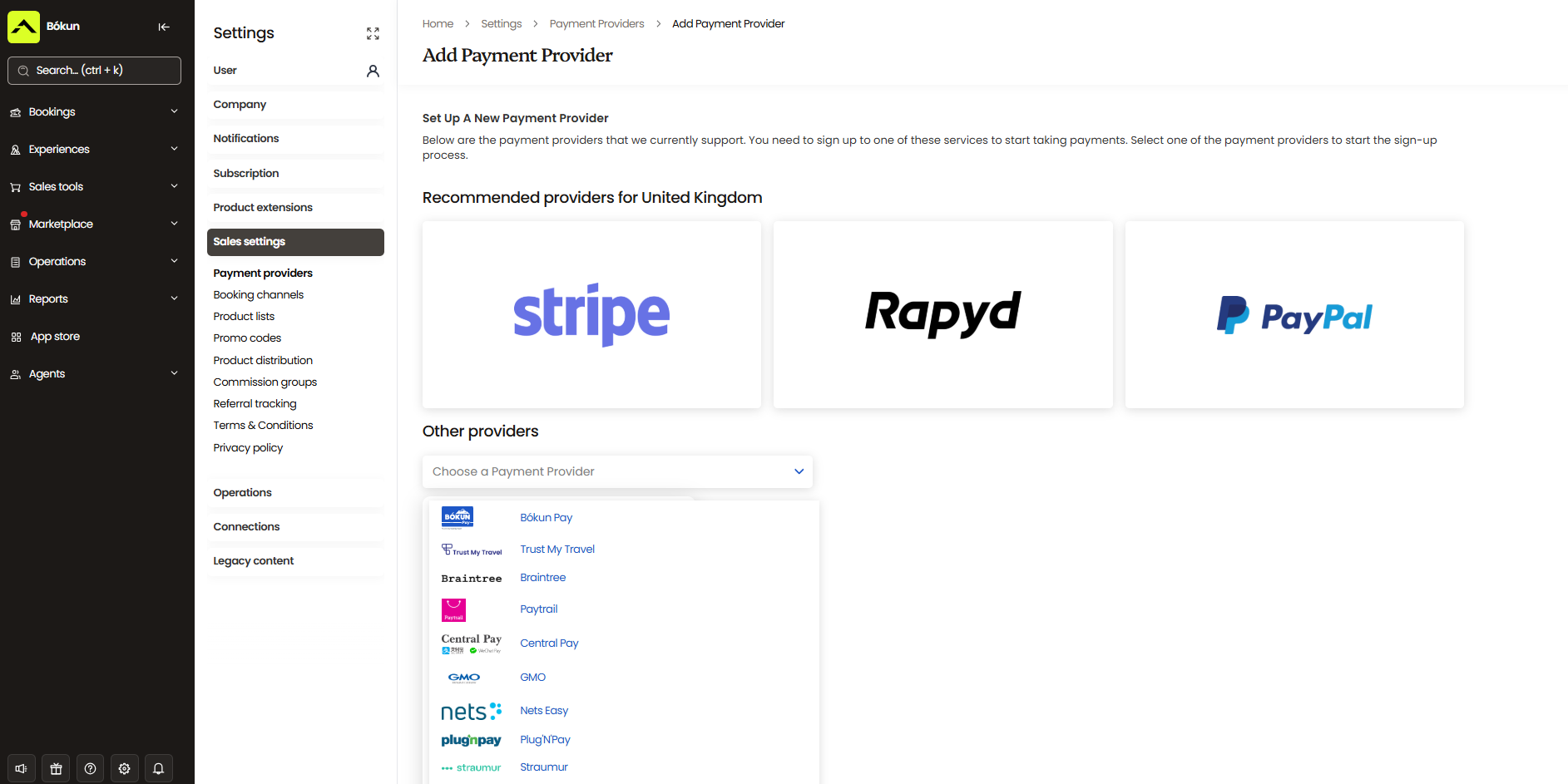
Bókun handles it all in one place. It integrates with over a dozen payment processors — including Stripe, PayPal, Braintree, Google Pay, Apple Pay, and Klarna — so customers can pay securely at the time of booking. You can also require deposits, send invoices, or let customers pay on arrival. Cash and in-person payments can be logged in Bókun too, so every transaction is accounted for regardless of how it was collected.
Keep your team in sync (without the spreadsheet chaos)
When you’re running tours on a spreadsheet, last-minute changes are a headache. A cancellation comes in, someone updates the sheet, and now you’re hoping every guide and staff member checks it before their shift. Often they don’t — and tours get held up, or staff show up for bookings that no longer exist.
Bókun keeps everyone on the same page automatically. You can add your whole team to the platform, share the booking calendar, and set permissions so each person sees what they need to. Guides get mobile app access so they can check their schedule and booking details from anywhere — no calls, no group chats, no spreadsheet hunting.
You can also manage guides’ availability, set work schedules, and ensure you’re never double-booking staff. When a booking changes or cancels, the update flows through to everyone instantly.
Manage customer relationships & automate your communications
Spreadsheets give you a list of names and email addresses. Bókun gives you a full CRM — a contact book that logs every customer’s booking history, preferences, and communication — so you can build real relationships and bring people back.
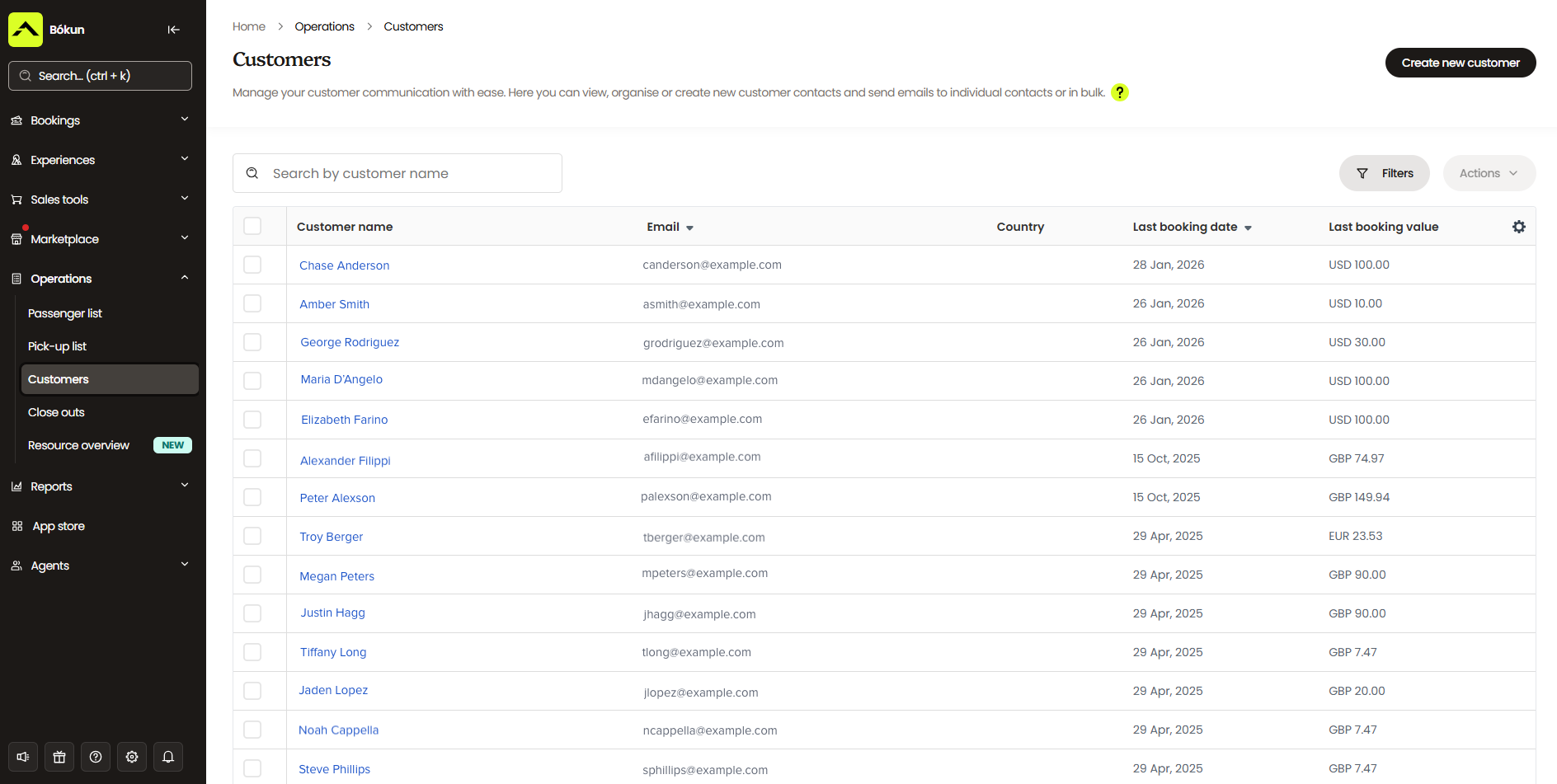
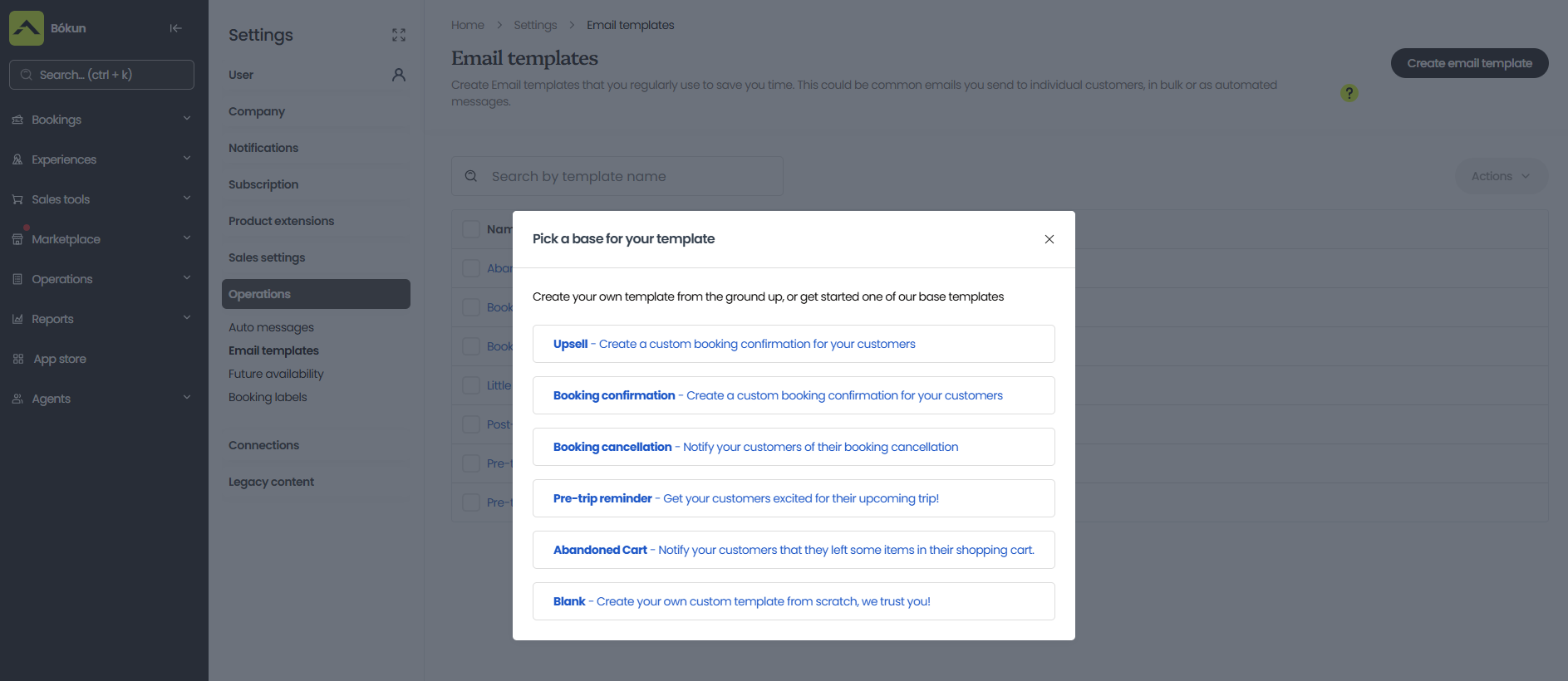
On top of that, Bókun automates the communications that currently eat up your staff’s time. Booking confirmations are automatically sent the moment someone reserves a spot. You can follow up with pre-arrival details, tickets, and waivers without lifting a finger. Reminder emails go out a few days before — reducing no-shows — and post-tour thank-you emails create natural opportunities to collect reviews and offer repeat-customer discounts.
Every template is fully customisable with your branding, and the whole thing runs without manual effort.
Understand your business with built-in reporting
One thing spreadsheets genuinely can’t do is tell you what’s working. You can count bookings, but you can’t easily see which tours are your best sellers, which sales channels are most profitable, or when your busy and slow seasons fall.
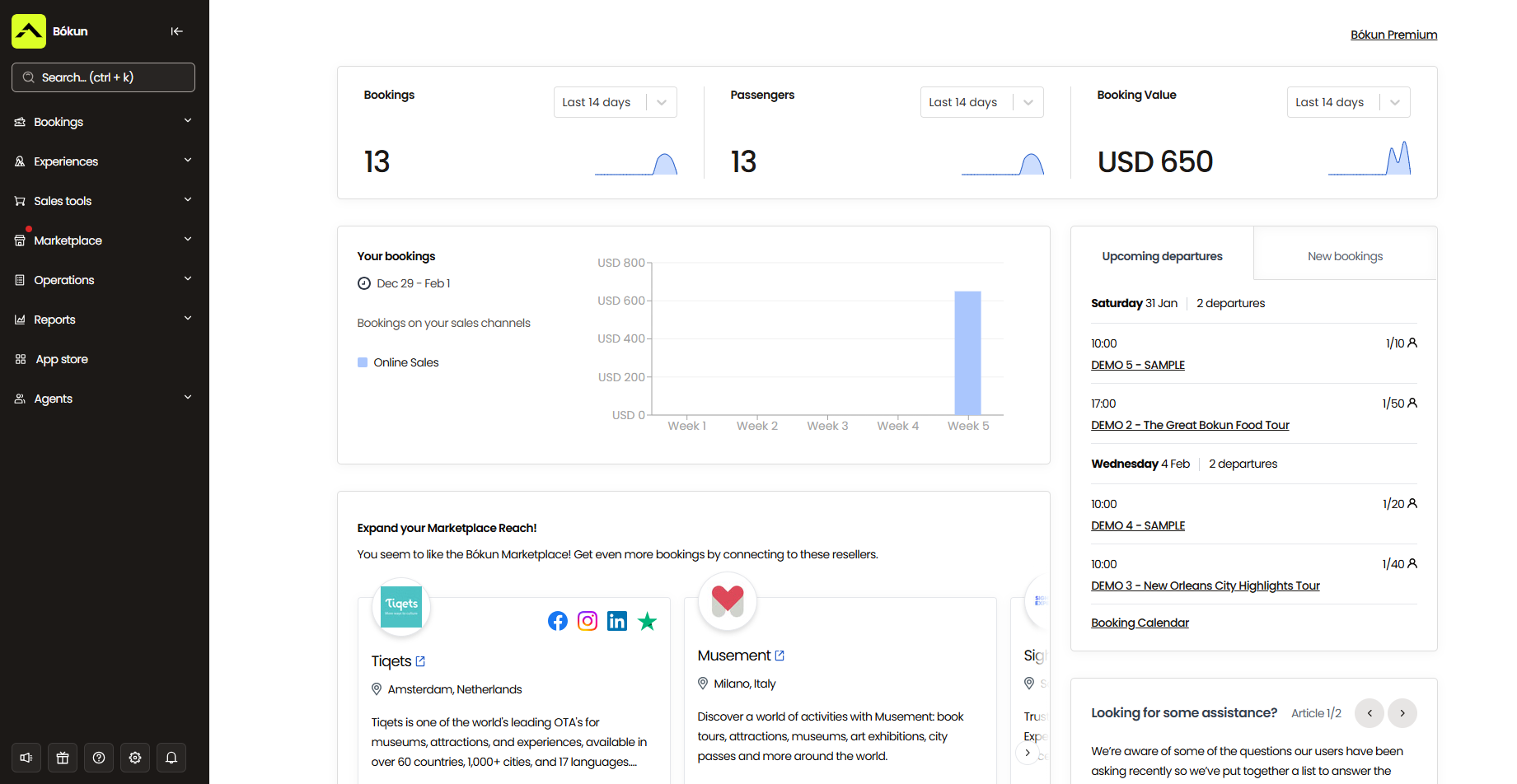
Bókun’s reporting suite gives you all of that. You can review past and upcoming bookings, track revenue by product or channel, identify seasonal trends, and analyse performance over any time period. It’s the kind of visibility that helps you track the metrics that matter and make smarter decisions — about pricing, marketing, staffing, and where to focus your energy.
What’s included with Bókun
Here’s everything Bókun packs under the hood:
Booking management tools
- Online booking widgets (compatible with all website builders) optimised to simplify the booking process and prevent abandoned carts
- One-click website builder with professional templates
- Booking management with a central calendar & real-time availability updates
Growth drivers
- Channel management & 70+ OTA connections
- The Bókun Marketplace with thousands of international travel partners
- Partner & contract management tools
- Referral Tracking to partner with affiliates
Product & resource management
- Product management with intuitive listing builders, dynamic pricing, upselling tools like add-ons, features to create combo packages, & Tripadvisor sync to feed reviews between platforms
- Resource management with real-time tracking & a variety of allocation rules to optimise utilisation
Customer management tools
- Customer self-service portals
- Check-in tools like mobile tickets & ticket scanning to streamline arrivals
Tools to automate back-office processes
- Native CRM to capture customer information, build an organised database, & fuel retargeting campaigns
- Automated communications with a gallery of email templates (for sending booking confirmations, mobile tickets, follow-ups, abandoned cart emails, & more)
- Business intelligence reporting to measure bookings and revenue over various categories
- Integrations with over a dozen online payment processing tools (Stripe, Apple Pay, Google Pay, PayPal, Worldpay, Braintree, Klarna, etc.)
- Mobile apps for iOS & Android
- The Bókun App Store, where you can add extra modules — digital waiver solutions, tip management tools, advanced reporting, SMS messaging, and more — to support our core features
And we offer all of this at the industry’s lowest rates.
Our START plan includes everything listed above for only $49/month with 1.5% online booking fees. We never charge for offline booking management, and as part of the Tripadvisor and Viator family, we waive Bókun booking fees on Viator reservations.
Bókun supports you no matter how far you scale. We even offer two enterprise-level packages, PLUS and PREMIUM, for teams with more specialised needs. These include advanced features such as agent portals, subvendor management, resource allocation, and Zapier integration. They also come with dedicated onboarding, priority support, and a yearly strategy call with our team.
Getting started
You can use Excel and Google Sheets to keep track of bookings for a short time: they’re low-cost, and as you saw above, creating a booking system in either tool isn’t time-consuming or difficult. But these tools only let you record bookings in a central sheet — they aren’t designed to support the entire booking experience, leaving a lot of ground uncovered.
Bókun is a natural next step for teams ready to move on from traditional spreadsheet systems. It’s built specifically for tour operators, so everything works the way your business actually operates. Most teams can get set up, add their products, and connect their sales channels in just an afternoon. We’re also one of the most cost-effective solutions around, which is why users rate us 4.7 stars for value for money.
Start your 14-day free trial (no credit card required).
Related reads: